How to Create Bilingual Invoices in TallyPrime for UAE Businesses
Learn how UAE businesses can create Arabic and English bilingual invoices in Tally Prime for clearer communication and smoother VAT compliant invoicing.
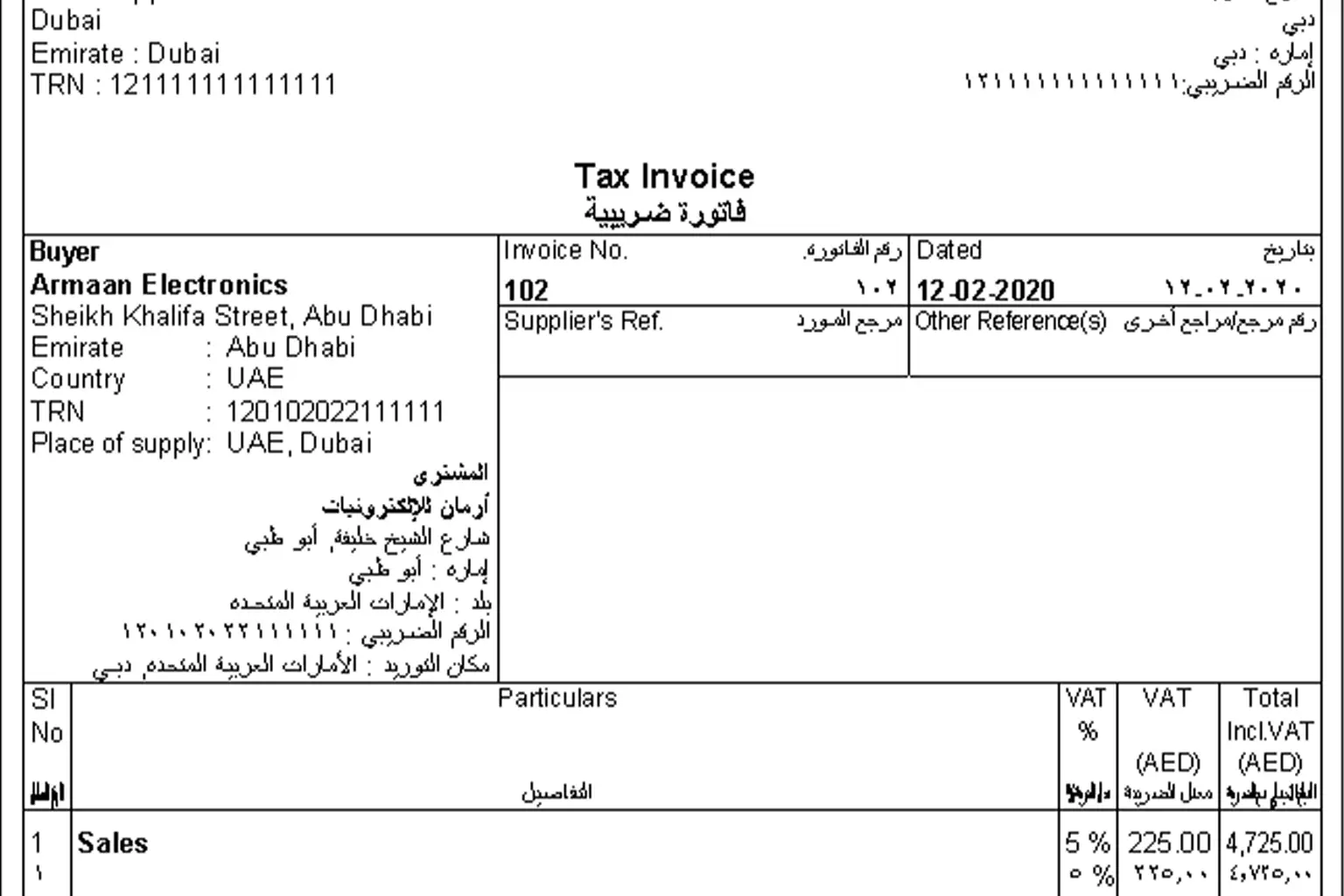
A common invoicing challenge in the UAE
Many businesses in the UAE deal with a mixed audience every day.
- Local customers who prefer Arabic
- International customers who expect English
- Internal teams who work in English
- Authorities who expect Arabic clarity
While English invoices are widely used, Arabic visibility on invoices is important in the UAE, especially for:
- Government related customers
- Arabic speaking clients
- VAT audits and document verification
- Professional and compliant brand image
This is why many UAE businesses choose bilingual invoices, where Arabic and English appear on the same invoice.
TallyPrime supports this requirement, but many users do not know how to set it up correctly.
What is a bilingual invoice in simple words
A bilingual invoice is a single invoice that shows details in both English and Arabic.
Usually, it includes:
- Company name and address in Arabic and English
- Customer name in both languages
- Item or service names in both languages
- VAT details clearly visible
- Amounts printed properly
This helps everyone read the same document without confusion.
In the UAE, bilingual invoices are not mandatory for all businesses, but they are strongly recommended for clarity, professionalism, and future compliance needs.
How UAE businesses actually use bilingual invoices
Let us look at a practical UAE example.
A Dubai based trading company:
- Sells to local UAE customers
- Supplies to government entities
- Works with overseas suppliers
Internally, accounts staff work in English.
Customers prefer Arabic invoices.
By using bilingual invoices in Tally Prime:
- Sales team issues one clear invoice
- Accounts team avoids duplicate documents
- VAT details remain consistent
- Customers understand invoices better
No separate Arabic invoice.
No manual translation.
No confusion.
Benefits of bilingual invoices for UAE businesses
Using bilingual invoices gives practical advantages, not just compliance.
- Improves clarity for Arabic and English readers
- Reduces disputes caused by misunderstanding
- Helps during VAT inspections and audits
- Builds trust with local customers
- Looks professional and organised
- Supports smooth internal communication
- Avoids rework and manual corrections
- Strengthens brand credibility in the UAE market
How Tally Prime supports bilingual invoicing
Tally Prime allows you to:
- Enter company details in Arabic
- Add Arabic names for customers and items
- Print invoices in English, Arabic, or bilingual
- Show VAT details clearly
- Save invoices as PDF files
Once set up, daily invoicing becomes very simple.
Step by step guide to create bilingual invoices in Tally Prime for UAE
Step 1: Enable local language support
Go to:
Gateway of Tally
Press F11 Features
Enable:
- Local language support
- Mailing details in local language
Save the settings.
Step 2: Enter company details in Arabic
Open:
Company alteration screen
Enter:
- Company name in Arabic
- Address in Arabic
- Emirate or region in Arabic
Save using Ctrl + A.
This ensures your invoice header appears correctly in bilingual format.
Step 3: Add Arabic names for customers and suppliers
Go to:
Gateway of Tally → Alter → Ledger
Open a customer ledger.
- Enable language alias for names
- Select Arabic language
- Enter customer name in Arabic
- Enter address details in Arabic if required
Save the ledger.
Repeat this for customers, suppliers, and cash or bank ledgers if needed.
Step 4: Add Arabic names for stock items or services
Go to:
Gateway of Tally → Alter → Stock Item
- Enable language alias
- Select Arabic
- Enter item name in Arabic
Save the item.
This step is important for trading and retail businesses.
Step 5: Configure invoice printing settings
Create or open a sales invoice.
Press:
Ctrl + P to print
Then press C to configure
- Invoice format: Simple or Commercial
- Print type: Bilingual
- Show amount in words in Arabic: Yes
- Show numerals in Arabic: Optional
- Footer message in Arabic if required
Save the configuration.
Step 6: Preview and print the invoice
Press I to preview or P to print.
Choose PDF printer and save the invoice.
Your invoice will now show Arabic and English together.
UAE VAT and bilingual invoices
Bilingual invoices do not change VAT calculation.
- VAT rate
- VAT amount
- TRN display
- VAT breakdown
They help during VAT audits, customer verification, and document checks.
Authorities can clearly read invoice details without translation.
Common mistakes UAE users make
- Arabic language enabled but no Arabic names entered
- Only company name translated, not items
- Using bilingual print without checking preview
- Mixing Arabic numerals unintentionally
- Forgetting to save configuration settings
- Assuming bilingual invoices affect VAT logic
Bilingual invoices affect presentation, not calculation.
When you should use bilingual invoices, and when you may not
You should use bilingual invoices if:
- You serve Arabic speaking customers
- You work with government or semi government entities
- You want a professional UAE compliant image
- You want fewer invoice disputes
You may not need them if:
- All customers accept English invoices
- Business is fully international
- No Arabic requirement from clients
Even then, preparing for bilingual invoicing is future safe.
Final advice for UAE businesses
Bilingual invoices are not about complexity.
They are about clarity and professionalism.
Once the setup is done in Tally Prime, daily invoicing takes the same time as before.
If you need help setting up bilingual invoices correctly or e-Invoice for your UAE business, the Tally Mena support team can assist and ensure everything is aligned with your invoicing and VAT requirements.