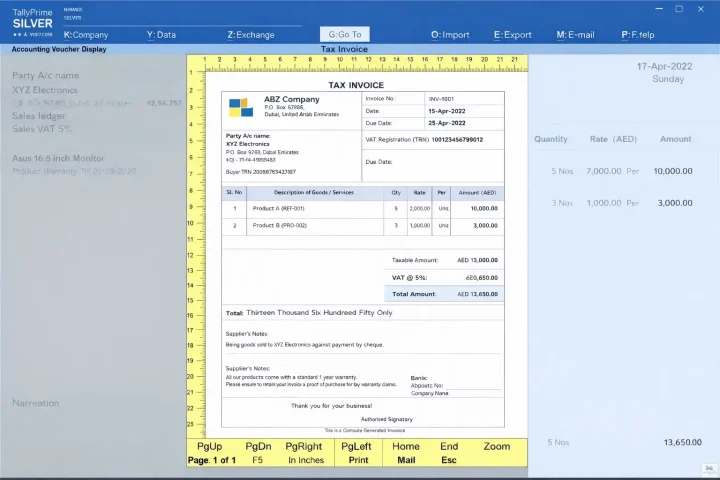

Invoices in Tally Prime may look correct, but UAE VAT returns often go wrong. This guide explains how wrong VAT classification in ledgers and stock items causes VAT mismatches, reporting errors, and FTA issues, and how to fix it correctly.
Many UAE businesses use TallyPrime daily for sales, purchases, and expenses. Invoices look fine, totals appear correct, and VAT is visible on the screen. However, When it is time to file the VAT return, problems often start to appear, such as:
In most cases, the issue is not related to the VAT rate, invoice format, or calculation method. The real problem is incorrect VAT classification in ledgers and stock items, which is one of the most ignored yet powerful TallyPrime software features that directly affects VAT accuracy and compliance for UAE businesses.
What is VAT classification in TallyPrime, explained simply
VAT classification in TallyPrime tells the software how a transaction should be treated for UAE VAT reporting.
Additionally, In simple words, it answers these questions for Tally:Many users think selecting 5 percent VAT is enough. It is not.
VAT rate controls calculation. VAT classification controls reporting and compliance.
Without correct classification, VAT reports become unreliable even if invoices look correct.

How a UAE trading company actually uses VAT classification
Let us take a real example.
Consequently, A Dubai based electrical trading company sells:All sales are entered in Tally Prime. VAT is applied correctly on local sales.
But during VAT return preparation:
Why?
Because all sales ledgers were using the same VAT classification.
Once VAT classification was corrected:
VAT return matched FTA expectations without manual adjustment.
How to set VAT classification correctly in Tally Prime, step by step
This is not complex, but must be done carefully.Step 1: Check if UAE VAT is enabled
Go to: Gateway of Tally F11 Features Statutory and Taxation
Moreover, Ensure:
Save the screen.
Step 2: Open the ledger you use for sales or purchases
Go to: Gateway of Tally Accounts Info Ledgers Alter
Furthermore, Select your Sales ledger or Purchase ledger.Step 3: Set VAT applicability correctly
Inside the ledger:
Now comes the important part.
Step 4: Select the correct VAT classification
Tally will ask for VAT classification.
Nevertheless, Examples you will see:
Choose based on the nature of transaction, not convenience.
For example:
Save the ledger.
Step 5: Repeat for purchase ledgers and expense ledgers
Do not ignore expenses.
Additionally, Rent, telephone, fuel, professional fees all need correct VAT classification.Wrong classification here affects input VAT recovery.
UAE specific benefits of using correct VAT classification
When VAT classification is set properly, UAE businesses get clear benefits. Accurate VAT return filing VAT return boxes match FTA requirements without manual correction. Clear separation of sales types Standard rated, zero rated, and exempt supplies show separately. Input VAT recovery becomes reliable Eligible and non eligible VAT is clearly identified. Less dependency on external adjustments No Excel corrections or last minute fixes before VAT filing. Lower risk during VAT audit FTA audits focus on classification errors, not calculation errors.Common VAT errors UAE users make with classification
These mistakes are very common in UAE Tally setups. These mistakes do not show immediately. They appear only during VAT return or audit.When you should use VAT classification carefully, and when not
You should use it carefully if: You may not need complex classification if: Even then, correct setup from the start avoids future issues.Final practical advice for UAE businesses
VAT in UAE is simple, but only if Tally Prime is configured correctly.Most VAT issues are setup issues, not software problems.
If your VAT return numbers do not match expectations, check VAT classification first before changing anything else.
If you need help setting this up correctly for your UAE business, TallyMena support team can assist and review your existing configuration to avoid future VAT errors.
Official reference used for understanding the feature
Federal Tax Authority VAT guidance and help referenceMost of these errors start with invoice setup. Our guide to creating a VAT compliant tax invoice walks through the fields that cause them, and the UAE VAT amendments for 2026 cover the reverse charge and refund changes.
Read Our Recent Blogs

Master Tally Prime: Your Ultimate Guide to Efficient Accounting
Unlock the full potential of Tally Prime with our comprehensive guide. Streamline your accounting and manage finances effortlessly like a pro!

Troubleshooting TallyPrime Installation Issues in UAE
TallyPrime installation issues in UAE offices are usually caused by system permissions, network restrictions, or license activation conditions rather than software defects. Many users download the installer successfully but face problems during setup, first launch, or activation. This guide explains how to identify and resolve these issues step by step in a structured and practical way.

What is TallyPrime Used For? Complete Guide for Businesses
TallyPrime is business management software used for accounting, inventory, taxation, compliance, and reporting. This guide explains how businesses use TallyPrime in real world operations.
Errors already posted have to be corrected at source. That cleanup, and the settings that stop it recurring, is part of Tally services in the UAE. The month end check that catches most of them is bank reconciliation in Tally.
To check a figure by hand, use the free VAT calculator and compare it with what TallyPrime produced.
Every free calculator we publish for UAE finance teams, including the VAT and excise tools, sits together on the free UAE tax and accounting tools page.
Need a hand with TallyPrime?
Tally Mena is an authorised TallyPrime partner in the UAE. Licences, cloud setup, VAT configuration and training, all handled by our Dubai team.
Talk to an expert